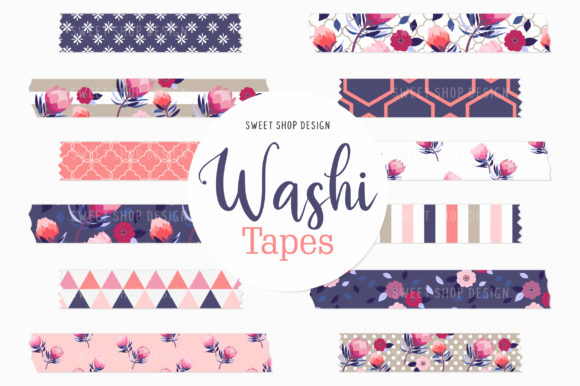
Elevating Digital Planning with Protea Flower Washi Tape Clipart
The transition from paper to screen has transformed how we organize our lives, but it hasn't diminished our desire for beauty and tactile expression. In the realm of digital planning, aesthetics are not merely decorative; they are functional tools that enhance engagement and memory retention. This is where specialized assets like Digital Washi Tape Protea Flowers become essential. Unlike generic digital stickers, these graphics bridge the gap between traditional scrapbooking charm and modern productivity workflows. Featuring a sophisticated blend of botanical illustrations, floral stripes, polka dots, and lattices, this specific collection offers a versatile palette for creators using Goodnotes, Notability, and other tablet-based planning applications.
The Intersection of Botanical Art and Functional Design
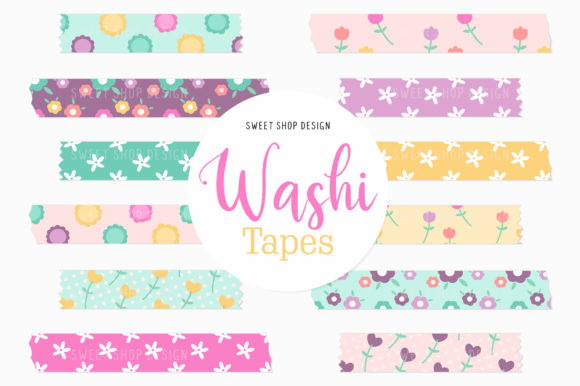
Protea flowers have long been celebrated in surface design for their bold, sculptural forms and rich textural details. When translated into Digital Washi Tape Clipart PROTEA FLOWERS Graphics, these organic shapes serve a dual purpose. Visually, they provide a striking focal point that breaks up the monotony of grid lines and typed text. Functionally, the washi tape format acts as a natural divider, header, or highlighter without permanently altering the underlying planner layout.
The inclusion of complementary patterns—floral stripes, polka dots, and lattices—is a critical design consideration. A standalone botanical illustration can sometimes feel too heavy or formal for daily planning. By pairing the protea motifs with lighter geometric and repeating patterns, this pack ensures visual balance. You might use a bold protea strip to mark a major deadline or birthday, while utilizing a subtle lattice pattern to underline daily to-do lists. This variety allows for a cohesive theme throughout a monthly spread without creating visual clutter.
Technical Specifications for Seamless Integration
For digital stationery to be truly useful, technical quality must match artistic merit. This pack includes 12 unique clipart pieces delivered in PNG format at a high resolution of 300 DPI. Understanding why these specifications matter is crucial for anyone serious about digital planning or design.
- 300 DPI Resolution: While screens typically display at 72 or 96 PPI, designing and storing assets at 300 DPI future-proofs your work. It ensures that when you zoom in on an iPad Pro or resize a sticker for a specific layout, the edges remain crisp rather than pixelated. This is particularly important for intricate botanical details like the fuzzy texture of protea petals.
- PNG Format with Transparency: The transparency channel is what distinguishes digital washi tape from a simple photograph. It allows the graphic to sit naturally over handwritten notes, typed text, or other background elements without a distracting white box border.
- Clean Files: A significant advantage of this specific digital download is the absence of watermarks and drop shadows on the source sheets. Many digital assets come with pre-applied shadows that look artificial against certain dark mode backgrounds or colored papers. Having a clean, flat PNG gives you total control to add your own shadow effects within your app if desired, or keep it flat for a modern, minimalist aesthetic.
Optimizing Workflow in Goodnotes and Notability
Adopting new digital assets should streamline your routine, not complicate it. Integrating Digital Washi Tape Protea Flowers into your existing ecosystem requires a simple but specific workflow to ensure accessibility across devices.
- File Management: Begin by unzipping the downloaded file on your computer or directly on your iPad using the Files app. Keeping your digital stationery organized in dedicated folders prevents the "digital mess" that often plagues creative workflows.
- Strategic Storage: Transfer the individual PNG images to your Photos Camera Roll. While some apps allow direct import from Files, saving to the Camera Roll often provides faster access via the photo picker tool within Goodnotes or Notability. This reduces friction when you are in the middle of planning and need to grab a sticker quickly.
- In-App Customization: Once imported to your digital planner page, utilize the native editing tools. Tap to edit, crop, or resize the washi tape. Because these are high-resolution vectors-turned-rasters, you can crop a wide strip down to a small accent piece without losing quality. Resize them to fit narrow margins or stretch them to span across two-page spreads.
This workflow highlights the flexibility of digital over physical media. With real washi tape, once you stick it, repositioning can tear the paper or ruin the adhesive. Digitally, you can experiment with placement, layer multiple strips for depth, or delete and replace them instantly until the layout feels perfect.
Beyond Planning: Versatile Creative Applications
While optimized for iPad planners, the utility of these graphics extends far beyond scheduling. The semantic relevance of "washi tape" in digital spaces has evolved to mean any decorative, semi-transparent overlay used for composition.
Digital Scrapbooking and Memory Keeping: For those documenting travels or family milestones digitally, protea flowers add a touch of exotic elegance. The floral stripes can frame photos, while the polka dot variations add a playful rhythm to journaling blocks. Since there are no physical shipping constraints, you can access these assets immediately for time-sensitive projects.
Web and Blog Design: Content creators often struggle to find cohesive branding elements that don't look corporate. These graphics work beautifully as section dividers in blog posts, decorative headers for Pinterest pins, or unique bullet points in newsletters. The 300 DPI resolution ensures they look professional even on high-density retina displays.
DIY Print Projects: Although designed for screens, the high resolution makes these suitable for print-on-demand projects. Use them to design custom gift tags, bookmarks, or physical planner inserts. Just remember to maintain the aspect ratio when printing to preserve the integrity of the botanical illustrations.
Choosing the Right Digital Assets for Your Style
When selecting digital stationery, consider how the art style aligns with your cognitive processing. Some users find highly detailed, realistic florals distracting in a productivity environment. The stylized nature of these Digital Washi Tape Protea Flowers strikes a balance; they are recognizable and beautiful but simplified enough to serve as background support rather than foreground noise.
Furthermore, consider the longevity of the design. Trendy neon colors or meme-based stickers may feel dated within months. Botanical themes, particularly those rooted in classic surface design patterns like lattices and stripes, possess a timeless quality. Investing in this type of aesthetic ensures your digital planner remains visually appealing year after year, reducing the need to constantly purchase new themes.
Finally, always verify the licensing and delivery method. The assurance that "no physical items will be shipped" confirms immediate digital access, which is vital for spontaneous creative bursts. Ensure you understand whether the license covers personal use only or extends to commercial design, especially if you plan to incorporate these graphics into client work or products for sale. For personal organization, journaling, and creative expression, however, this pack offers a robust, high-quality foundation for beautifying your digital life.